Route Model Traffic Dynamically
Introduction
In this module, you will use AI Gateway dynamic routing to send requests from the Seven Hills AI Agent to different Workers AI models based on business context. You will keep standard shopping requests on the established model, route premium Concierge requests to a more capable model, and compare usage and estimated cost in AI Gateway Analytics.
This separates model selection from the storefront so that Seven Hills can align model capability and cost with each ecommerce experience, while changing routing policy without redeploying the agent.
Architecture Goal
Seven Hills -> dynamic/seven-hills-route
                         |
              request_type == concierge?
                     /             \
                   yes              no
             Kimi K2.6       Llama 3.3 70B
              Concierge       standard chat,
The browser selects an application feature, not a model. Then, the Worker assigns request_type as standard_chat or concierge and the AI gateway owns model selection. A separate server-side intent check decides whether a standard-chat request receives MCP tools. Unknown or missing request types follow the existing Llama 3.3 70B branch.
Steps
1. Edit the deployed route
- Go to AI > AI Gateway >
seven-hills> Dynamic Routes. - Open
seven-hills-route. - Replace the direct Start-to-Model connection with a Conditional node. Split traffic > If... Else
- Select the Split block and configure:
| Field | Value |
|---|---|
| Condition field | metadata.request_type |
| Operator | equals |
| Value | concierge |
- On the true branch, add a Workers AI model node for
@cf/moonshotai/kimi-k2.6. - On the false branch, add a Workers AI model node for
@cf/meta/llama-3.3-70b-instruct-fp8-fast. - Connect both branches to End if required.
- Select Save and deploy the new version.
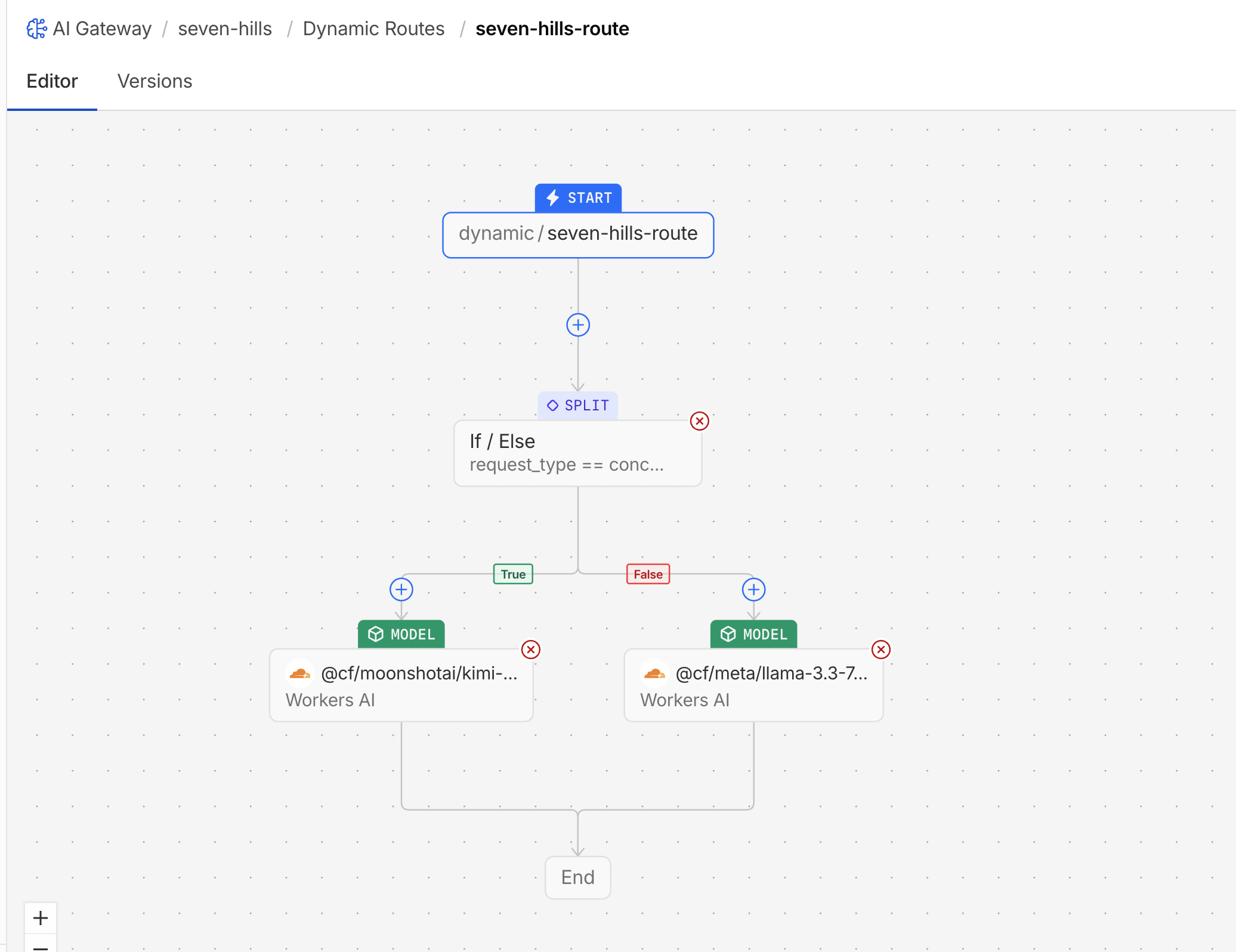
Cloudflare describes Kimi K2.6 as a frontier-scale reasoning model with a 262,144-token context window. Its published price is $0.95 per million input tokens and $4.00 per million output tokens, compared with $0.29 and $2.25 for Llama 3.3 70B.
Seven Hills keeps calling the same route while the business changes which model handles each shopping experience. Ecommerce teams can give premium Concierge requests a more capable model, keep routine product questions on a lower-cost model, and roll back a routing change without waiting for a storefront release.
2. Test routing after the change
- Go to AI Gateway >
seven-hills> Logs, then select LIVE. - In Chat with Sofia, send
Reply with the single word ROUTE_OK.. - Open Concierge Request Builder, use
Reply with the single word ROUTE_OK.as the customer prompt, and send the request. - Return to the live log stream, open the two new logs, and compare:
| Metadata | Expected selected model | Expected outcome |
|---|---|---|
request_type: standard_chat | @cf/meta/llama-3.3-70b-instruct-fp8-fast | Success |
request_type: concierge | @cf/moonshotai/kimi-k2.6 | Success |
Confirm /api/ai-gateway/status still reports dynamic/seven-hills-route. No Worker re-deployment was required for this outcome.
3. Compare estimated cost by use case
- In
seven-hills, open Analytics. - Select a time range "last 30 minutes".
- Test filter:
| Filter | Operator | Value |
|---|---|---|
| Metadata Value | equals | standard_chat |
- Record the requests, tokens, and estimated cost shown for standard chat.
- Change Metadata Value to
conciergeand compare the two results - Remove the filter and view how they compare in Tokens and Cost below.
Your exact cost values will vary with generated output length. The expected proof is attribution: standard chat is charged to the Llama 3.3 70B use case, while Concierge is charged to the Kimi K2.6 use case.
What You Established
You configured a conditional dynamic route that sends standard chat to Llama 3.3 70B and premium Concierge requests to Kimi K2.6. Gateway logs confirmed that trusted request_type metadata selected the intended model, and Analytics attributed usage and estimated cost to each use case.
Both shopping paths remained operational, while model selection moved under centralized gateway policy. Seven Hills can now reserve higher-cost capability for premium interactions without changing the storefront or exposing routing decisions to customers.
Customer Talk Track
"The application still calls one logical route. AI Gateway uses trusted request context to give premium Concierge traffic a more capable model while standard shopping traffic stays on the established model. We changed model policy without redeploying the agent, then measured requests, tokens, and estimated cost by use case."
Checkpoint
The gateway now selects models and exposes cost for two Seven Hills business use cases. Continue to Control Cache, Request Rate, and Spend.
Troubleshooting
Both requests still use Llama 3.3 70B
- Confirm the edited route version was deployed, not only saved.
- Check that the Worker still requests
dynamic/seven-hills-route. - Compare timestamps so you are reading logs created after the route deployment.
Concierge follows the Llama 3.3 70B branch
- Check for the exact field
metadata.request_type. - Confirm the comparison value is lowercase
concierge. - Expand the request log and verify the metadata supplied by the Worker.
The route returns model not found
- Confirm both model names include the full
@cf/prefix. - Select the models from the route editor rather than typing shortened names.
- Roll back to the initial route version if the node cannot be repaired quickly.
Responses differ but the logs show the same model
Model output is probabilistic. Validate routing with model and metadata fields in logs, not response wording, length, or quality.
Kimi K2.6 returns a paid-access error
- Confirm the lab account has Workers Paid when the gateway uses Standard billing.
- If the facilitator provided prepaid AI Gateway credits, confirm Workers AI Billing is set to Unified billing.
- Use the initial all-70B route if the premium model is unavailable.
Analytics does not separate the two request types
- Confirm both post-change requests produced successful logs.
- Confirm each log contains
request_typewith the expected value. - Apply both Metadata Key equals
request_typeand Metadata Value equals eitherstandard_chatorconcierge. - Change the metadata-value filter between the two values; Analytics does not group them automatically.
- Remove unrelated Analytics filters and select a time range containing the post-change requests.
- Allow for dashboard ingestion delay, then refresh once.