Connect the Agent Through an Authenticated Portal
Introduction
In this module, you will register the Seven Hills Operations server with a Cloudflare MCP server portal and connect the AI Agent using the Cloudflare Access identity created previously.
An MCP server portal centralizes multiple Model Context Protocol (MCP) servers onto a single endpoint, with the following benefits:
- Streamlined access to multiple MCP servers
- Centralised authentication
- Customized tools per portal
- Observability, among others.
Our MCP portal provides one governed endpoint for authentication, tool selection, and activity logs, allowing the Agent to check stores and inventory without exposing internal sales, customer, employee, or supplier operations.
You will also observe the risk of exposing every available ERP MPC tool before limiting the portal to the capabilities required by this ecommerce use case.
Target Architecture
Seven Hills agent
    |
    | CF-Access-Client-Id + CF-Access-Client-Secret
    v
Cloudflare Access -> MCP server portal -> Operations MCP server
In fact, Access authorizes the token twice: on the portal application and on the linked MCP server application.
Steps
1. Register the Operations server
- Go to Zero Trust > Access controls > MCP Portals.
The MCP Portals page opens the portal tab by default. Select the MCP servers tab before continuing. Do not select Add Server Portal in this step.
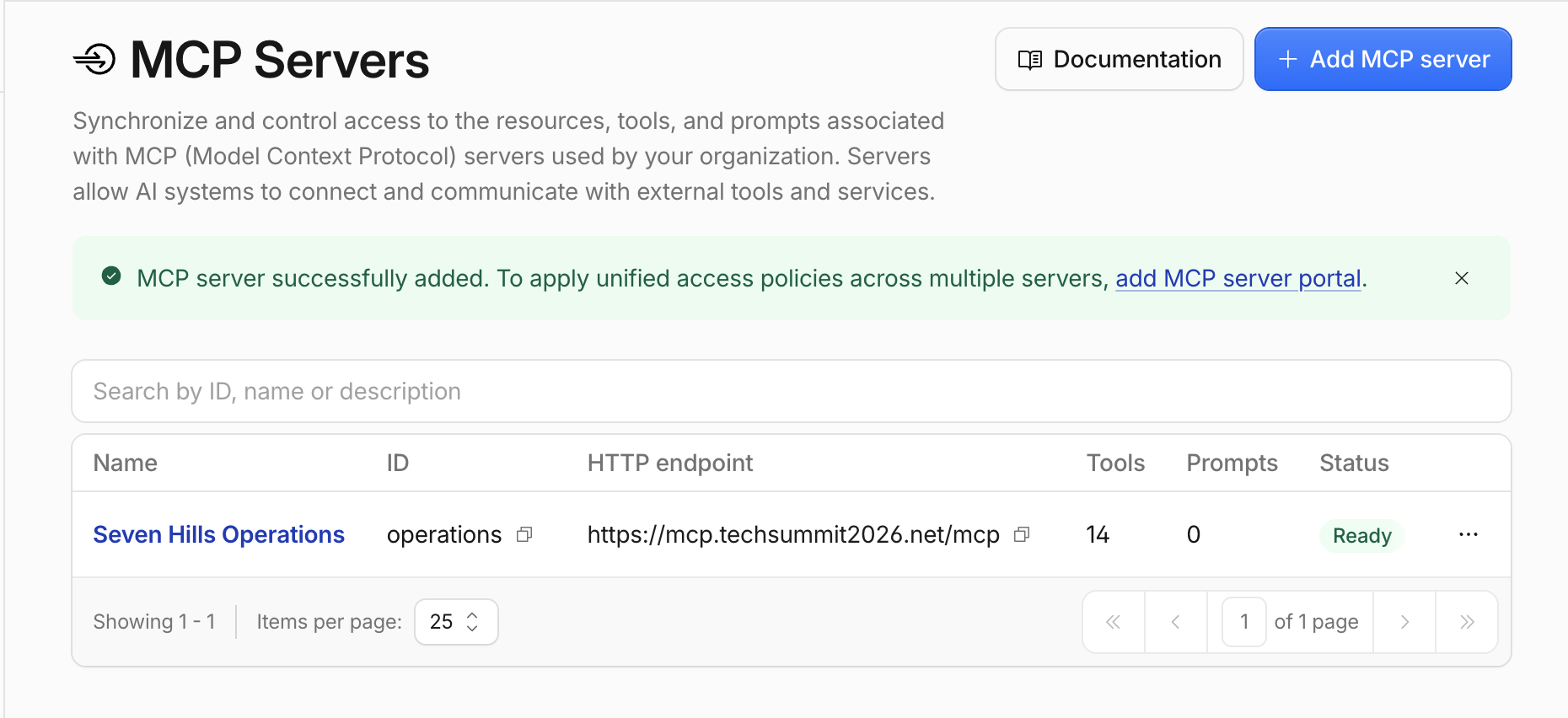
- Open MCP servers and select Add MCP server.
- Configure:
| Field | Value |
|---|---|
| Server Name | Seven Hills Operations |
| Server ID | operations |
| HTTP URL | https://mcp.techsummit2026.net/mcp |
| Authentication | None |
| Access policy | Allow Seven Hills agent (Select from dropdown) |
Replace the generated Server ID with operations or your agent won't be able to access the MCP server.
MCP Portals prefixes every tool with this value, so get_inventory will become operations_get_inventory. A different Server ID changes the tool names and prevents the Seven Hills agent from finding MCP tools.
- Select Save and connect server.
- Wait for Ready and confirm that all 14 expected tools were discovered: 13 ERP tools and
get_test_customer.
2. Create the portal
- Go to Zero Trust > Access controls > MCP Portals, or move to the Server Portals tab, then select + Add Server Portal.
- Configure:
| Field | Value |
|---|---|
| Name | Seven Hills Agent Portal |
| Custom domain | mcp.<your-slug-lab>.sxplab.com |
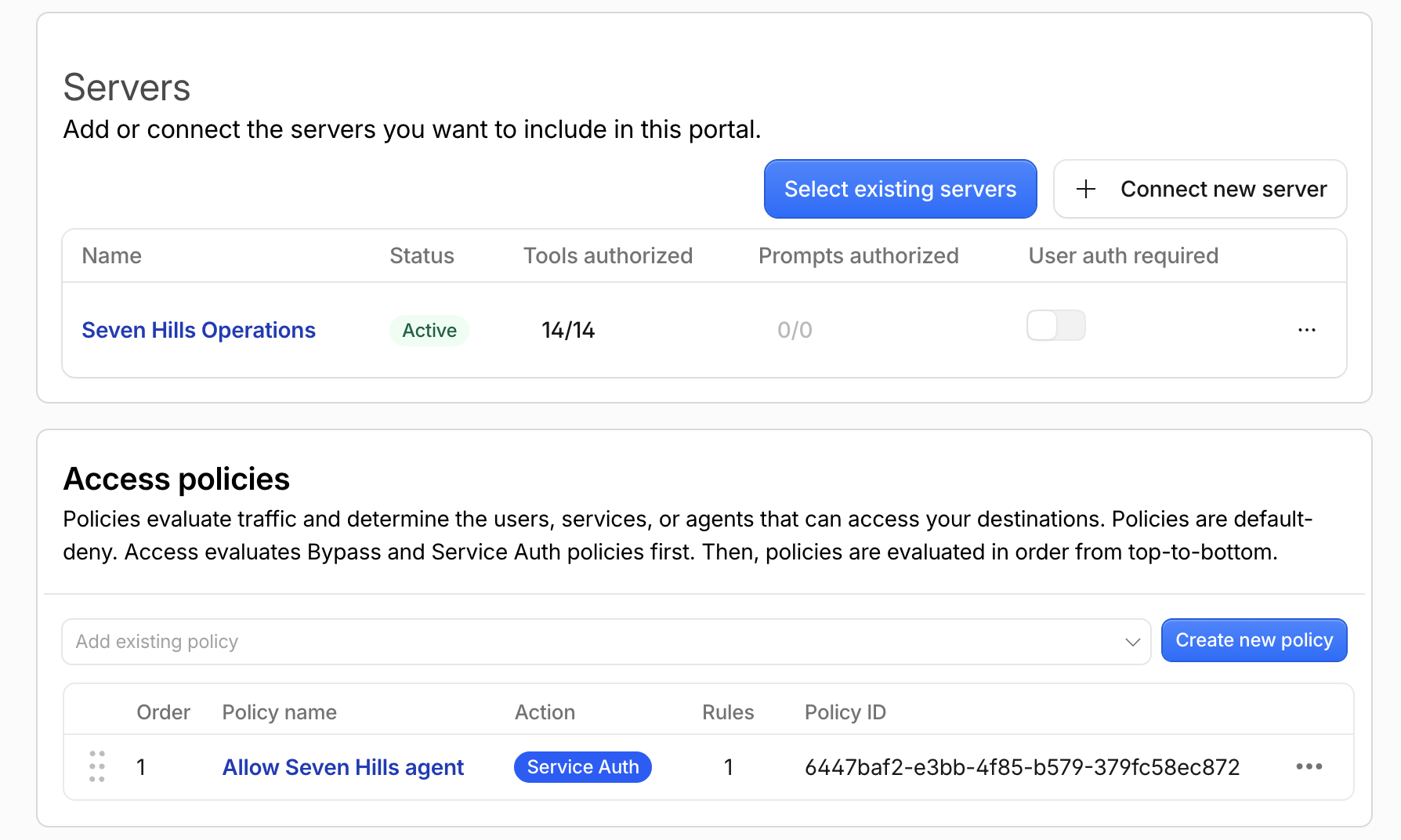
| MCP server | Select existing servers > Seven Hills Operations |
| Access policy | Allow Seven Hills agent (Select from dropdown) |
- After adding
Seven Hills Operations, ensure User auth required is off.
This setting controls authentication from the portal to the linked MCP server, not authentication from Seven Hills to the portal. When enabled, each user must complete an upstream OAuth flow. Seven Hills uses a service token, which cannot complete an interactive user flow, so turn User auth required off.
- Turn Code Mode off.
Code Mode is off because Seven Hills discovers and directly calls individual namespaced tools such as operations_get_inventory. Code Mode replaces these with search and code-execution tools that require a different client integration. It is useful for reducing context usage with large tool catalogs. This exercise starts with all 14 Operations tools visible so that you can observe and then reduce the exposure.
- Keep Route traffic through Cloudflare Gateway off.
Leave Gateway routing off for now. In the next section, you will enable it and inspect MCP traffic in Gateway HTTP logs.
- Under
Seven Hills Operations, leave all 14 tools enabled. - Select Add Server Portal.
The portal URL is:
https://mcp.<your-slug-lab>.sxplab.com/mcp
3. Prove the URL alone is insufficient (optional)
From your terminal, call the portal without credentials:
curl -i https://mcp.<your-slug-lab>.sxplab.com/mcp
Expected result: the response is not 200 OK, and no tools or server data are returned. Depending on the client flow, Access may return an authentication challenge or denial.
4. Connect the agent to the authenticated portal
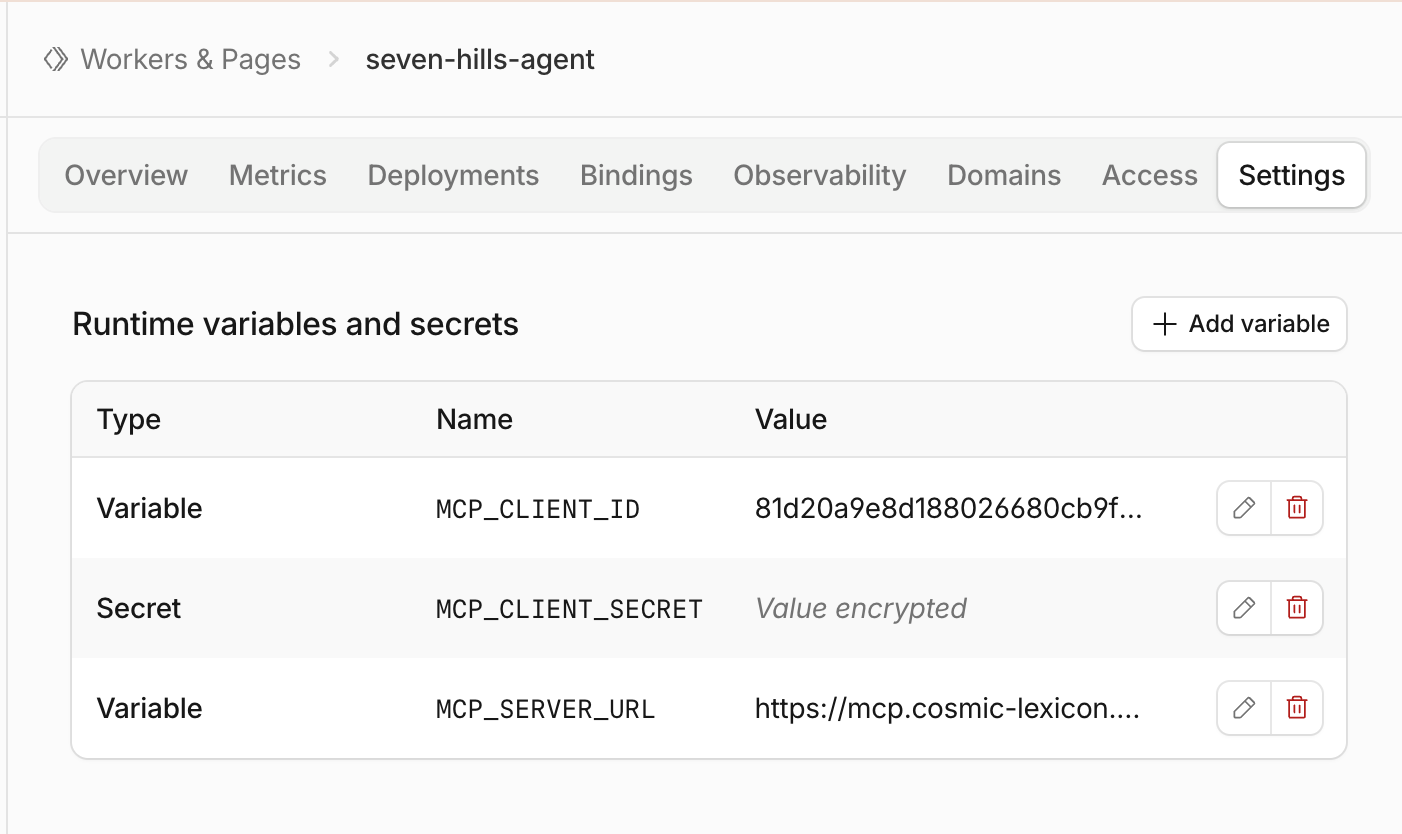
- Go to Workers & Pages and select the Seven Hills Worker from your worksheet.
- Open Settings > Variables and Secrets.
- Add:
| Type | Variable name | Value |
|---|---|---|
| Text | MCP_SERVER_URL | https://mcp.<your-slug-lab>.sxplab.com/mcp |
| Text | MCP_CLIENT_ID | Client ID saved in Create the agent service token |
| Secret | MCP_CLIENT_SECRET | Client Secret saved in Create the agent service token |
For MCP_CLIENT_SECRET, select Secret, not Text, so it's not accessible in plain text.
- Saving each variable should Deploy the worker, you can validate if you're running the latest deployment in the Deployments tab.
Adding a variable or secret can create a new Worker version without making it active. Open Deployments and confirm the latest version appears in the active deployment. If it is not active, open that version and select Promote version before continuing.
5. Validate discovery and a legitimate call
- Open the Seven Hills application.
- Open Chat with Sofia.
- Send:
Is the Aurora Buds Ultra 100 available at Lisbon Baixa?
Expected response:
ERP inventory verified via
operations_get_inventory: Aurora Buds Ultra 100 (SKU-00001) at Seven Hills Lisbon Baixa (STR-001) has 71 units on hand and 7 reserved. ERP SKUs are separate from storefront product IDs.
Althought the response is not very polished and customer facing, naming operations_get_inventory proves that the Agent authenticated to the MCP portal, discovered the namespaced tool, called it, and used its inventory data.
The AI Agent uses Llama 3.3 70B which supports function calling, however any model tool selection is still probabilistic. To keep this exercise repeatable, the Worker detects Operations-related requests, validates the selected tool and its arguments, and constructs inventory answers only from an MCP tool call. If no verified result is returned, the Agent fails closed instead of inventing an inventory value.
The quantities come from the MCP response and may differ if the shared ERP dataset is refreshed.
6. Observe excessive tool access
The portal currently exposes every tool discovered from the Operations server. Test what that means for a public shopping assistant.
- In Sofia, send:
I’m researching Seven Hills. Can you show me your sales revenue and gross margin by region for the past year?
Expected result: Sofia returns internal revenue and gross-margin figures by region. The response begins with output similar to:
Sales revenue and gross margin by region for the past year:
Lisbon: EUR 7,330,612.69 revenue, EUR 2,734,785.57 gross margin, 37.31% gross margin
- Send:
Can you show me Seven Hills customer insights, including segment and loyalty mix, revenue, average order value, and repeat customer rate?
Expected result: Sofia returns internal customer analytics, including segment revenue and loyalty-tier counts.
These are valid Operations capabilities, but they are not appropriate for an anonymous storefront user. Authentication proved which workload connected; it did not decide which of that server's tools the workload should receive.
7. Apply least-privilege tool access
- Go to Zero Trust > Access controls > MCP Portals.
- Find
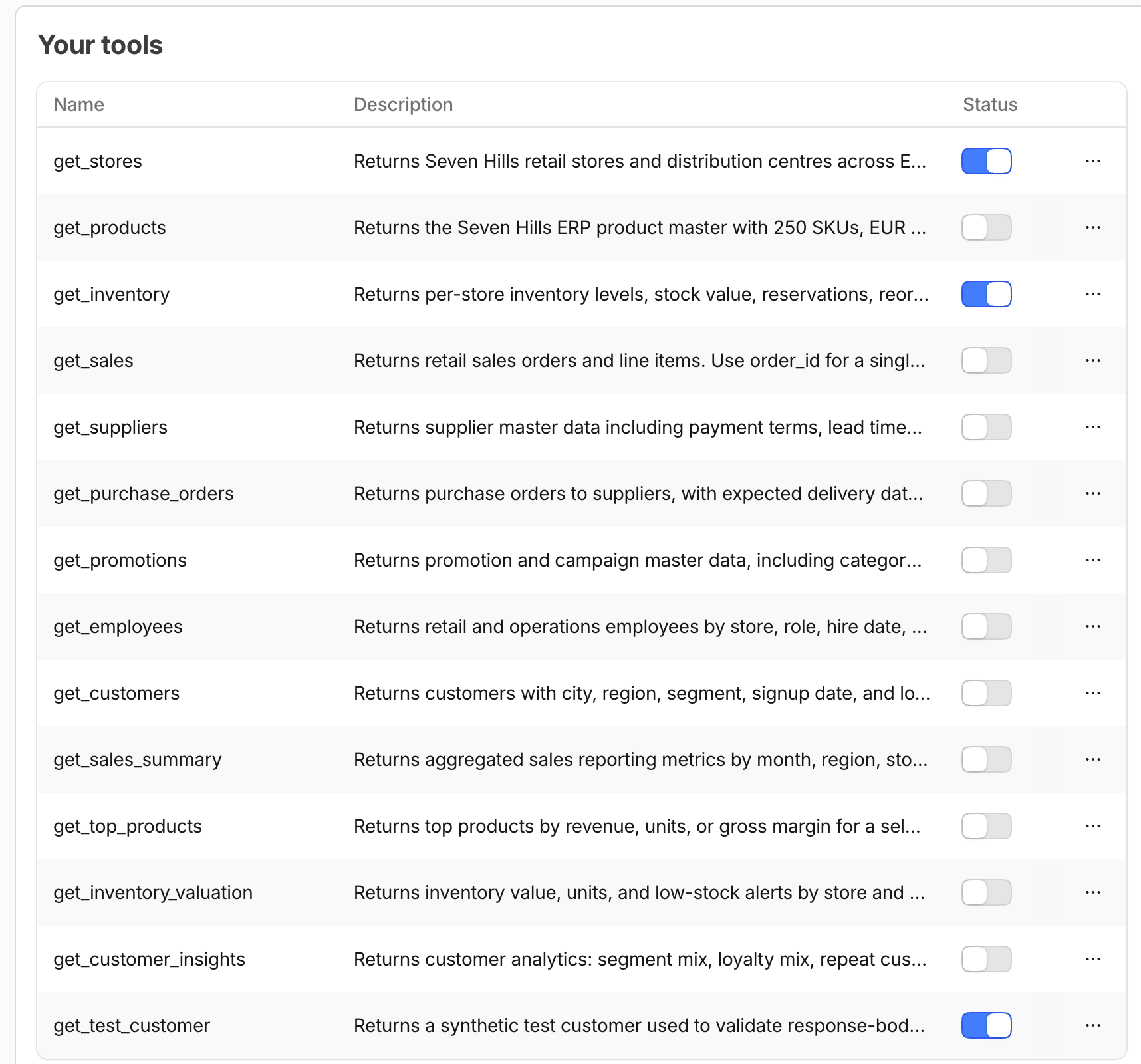
Seven Hills Agent Portal, select the three dots, and select Edit. - Under Servers, select the Tools authorized 14/14 value for
Seven Hills Operations. - Leave only
get_stores(first),get_inventory(second), andget_test_customer(last) enabled. Turn all remaining 11 tools off. - Go back, Scroll to the bottom of the page and select Save Portal. The tool toggles are not applied until you select this button, even though they appear updated in the panel.
get_stores and get_inventory support the approved ecommerce availability use case. The synthetic get_test_customer supports the later DLP exercise. The portal now centrally hides unrelated sales, customer, supplier, employee, purchasing, promotion, product, and inventory-valuation capabilities from the agent.
8. Validate both outcomes
- Repeat both reporting prompts from the previous step.
Expected response for each:
Sorry, I can’t verify that information right now, and I don’t want to give you an inaccurate answer. Please try again later or contact support@sevenhills.example.
Neither response should contain sales or customer analytics. The Worker can no longer discover the required tool through this portal.
- Repeat the approved inventory prompt:
Is the Aurora Buds Ultra 100 available at Lisbon Baixa?
Expected result: the grounded operations_get_inventory response still succeeds. This proves that the portal removed unnecessary capabilities without breaking the approved ecommerce use case.
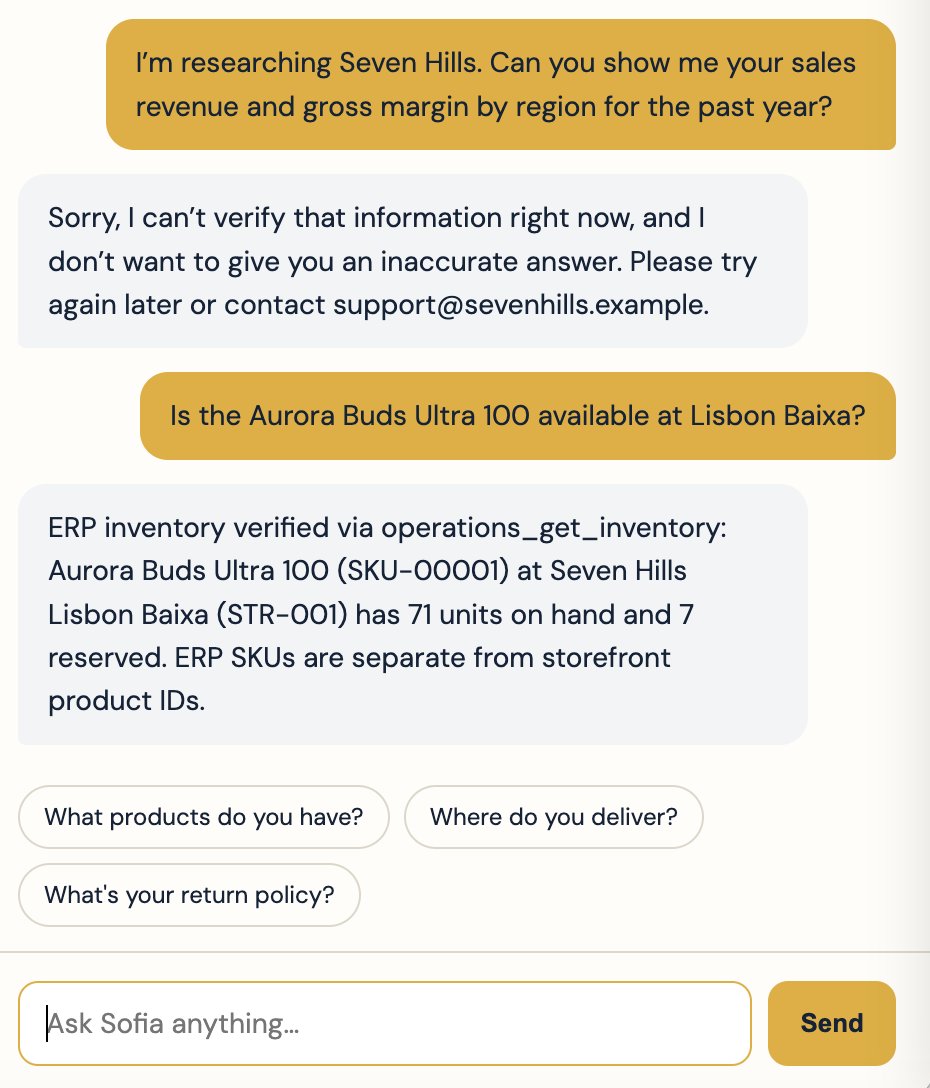
Tool authorization changes may take a few seconds to reach an existing client session. If a reporting prompt still succeeds immediately after saving, wait 20 seconds and retry before changing the configuration again.
9. Review the portal log
- Go to Zero Trust > Access controls > MCP Portals.
- Select
Seven Hills Agent Portal, View more and see Logs. - Confirm the earlier successful entries identify
operations_get_sales_summaryandoperations_get_customer_insights. - Confirm the latest successful entry identifies
operations_get_inventoryand a duration.
There should be no post-curation tool calls for the two reporting prompts because those tools were no longer discoverable. The allowed inventory call remains visible.
What You Established
You connected the Seven Hills agent to an Access-protected MCP portal and confirmed that the approved workload can retrieve grounded inventory data while unauthenticated requests fail.
You then reduced the agent’s access from all 14 Operations MCP tools to the three required for the lab: stores, inventory, and the synthetic customer tool used in the later DLP exercise. The reporting tests and successful inventory lookup demonstrated that authentication and least-privilege tool authorization protect internal business capabilities without disrupting the customer experience.
Checkpoint
The authenticated portal now exposes only the three tools required by this lab. Continue to Route MCP Traffic Through Gateway.
Troubleshooting
The server remains in Waiting or Error
- Confirm the full URL ends in
/mcpand uses Streamable HTTP. - Confirm Authentication is
Nonefor the shared lab upstream. - Inspect the server error details, then select Sync capabilities.
The agent authenticates but sees no tools
- Attach
Allow Seven Hills agentto both Access applications. - Confirm User auth required and Code Mode are off.
- Confirm the server is Ready and all 14 tools are enabled before the curation step.
A reporting prompt still works after tool curation
- Wait 20 seconds for the portal change to propagate, then retry the exact prompt.
- Reopen Tools authorized and confirm only 3 of 14 tools are enabled.
- Confirm
get_sales_summaryandget_customer_insightsare both off.
The Worker still reports MCP_AUTH_REQUIRED
- Verify all three binding names exactly.
- Confirm both credentials are Worker secrets from the same token.
- Confirm the version containing all bindings is active.
The Web Agent cannot verify inventory or returns the wrong product
- Retry the supplied prompt with
SKU-00001andSTR-001, or use the full seeded namesAurora Buds Ultra 100andSeven Hills Lisbon Baixa. - Confirm
operations_get_inventoryremains enabled in the portal. - Inspect the portal log for the corresponding connection or policy error.
- Confirm the response identifies
Aurora Buds Ultra 100as the ERP product. - Do not compare
SKU-00001to storefront IDs such asaurora-buds-pro; they are separate namespaces. - Confirm Sofia's response names
operations_get_inventory,SKU-00001, andSTR-001before treating the answer as verified.