Protect MCP Responses With DLP
Introduction
In this module, you will use Cloudflare Gateway and Data Loss Prevention (DLP) to inspect responses returned by the Operations MCP server. You will create a payment-card detection profile and a response-body policy that blocks sensitive tool output before it reaches the Seven Hills AI Agent, model, or customer.
This protects the ecommerce experience at the data boundary: the agent can continue using approved inventory information while payment data is prevented from entering the model context. You will also review the encrypted DLP event, giving security teams evidence for investigation without allowing Cloudflare to decrypt the logged payload.
Architecture Context
Operations MCP server
    |
    | tool response
    v
Gateway DLP ----X----> MCP portal -> Seven Hills agent -> model/user
    |
    +-> return a blocked-tool error instead of matched content
We will use a policy targetting Response Body for the purpose of this lab, however Gateway scans both requests and responses.
Steps
1. Create a lab-only DLP profile
- Go to Zero Trust > Data loss prevention > Profiles.
- Search Financial Information.
- Edit the Financial Information profile.
- Select VISA card number and VISA text
- Select Save profile. You should see two Detection entries enabled.
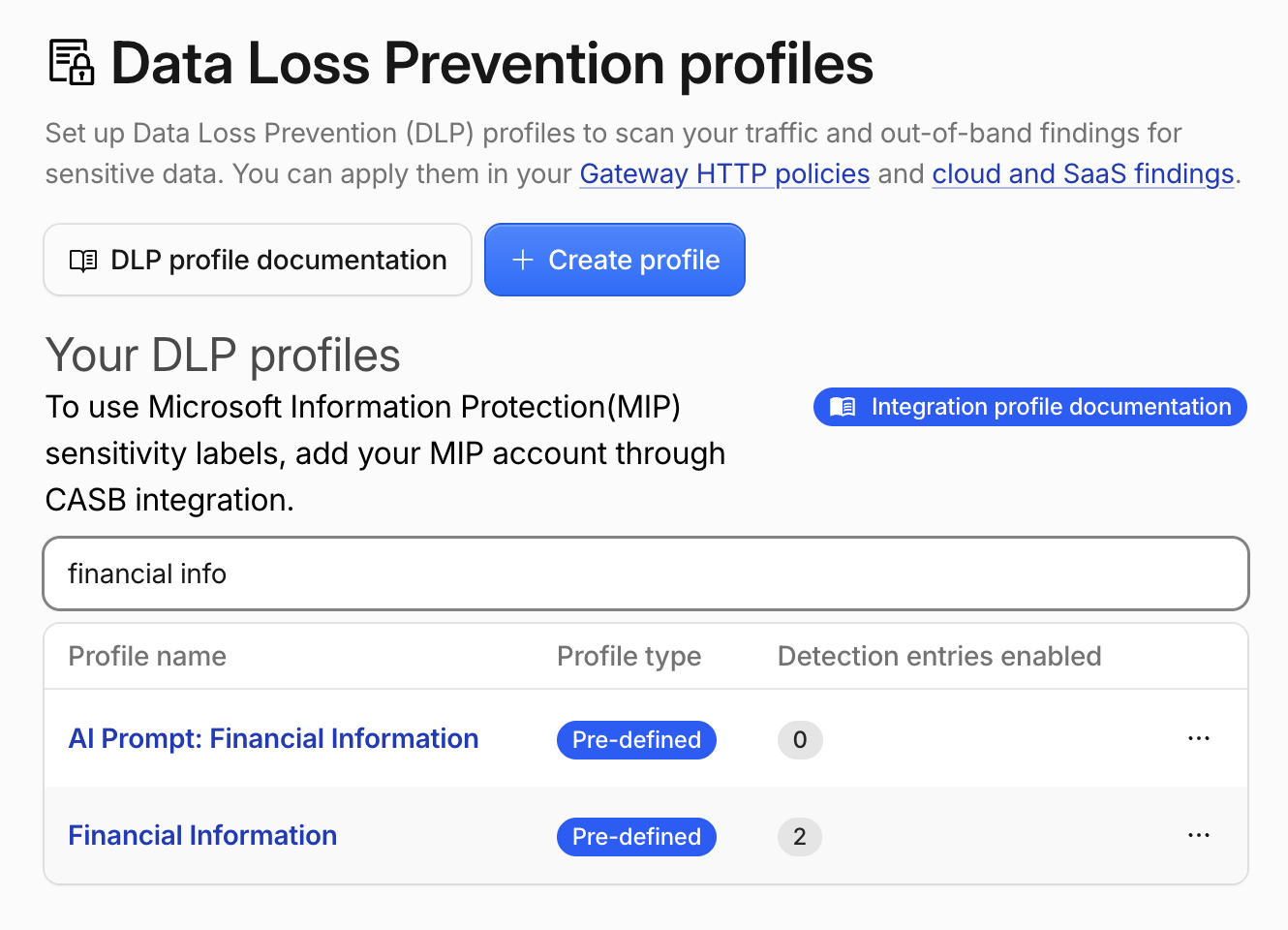
A DLP profile groups the detection logic Cloudflare applies to inspected traffic.
If you are wondering why we didn't use AI Prompt profiles here:
AI Prompt profiles classify the content and intent of user prompts sent to supported generative AI applications such as ChatGPT, Gemini, Perplexity, and Claude. For example, they can detect an employee pasting customer data into a prompt or asking an AI assistant to retrieve personal information from a connected system.
MCP tool requests and responses use a different protocol format, so AI Prompt profiles do not match MCP portal traffic. In this exercise, the risk is an actual payment-card number returned by the Operations server. The custom profile therefore uses the predefined Visa Card Number entry, which detects and validates the card number in the MCP response body.
2. Configure payload-log encryption
DLP encrypts logged payload excerpts with your public key. The matching private key remains with you and is required to decrypt the log later.
- Go to Data loss prevention > DLP settings.
- In DLP payload and prompt encryption public key, paste the following lab public key:
6XyhYI+7Y4aBilrNzuVktujxuazPeCGoJwNghIDlXis=
- Select Save.
- In Payload log masking, select Clear text.
For lab validation, Clear text retains the complete matched test value and 75 bytes of surrounding context before encrypting the excerpt with the public key. Cloudflare does not have the private key and cannot decrypt the payload log. In production, choose the least-revealing masking level that gives investigators the context they need.
3. Create the response-body block policy
- Go to Traffic policies > Firewall policies > HTTP.
- Select Add a policy.
- Configure:
And traffic matches...
| Field | Value |
|---|---|
| Host | in mcp.techsummit2026.net |
| Logic | And |
| DLP Profile | in Financial Information |
| Logic | And |
| Body Phase | is Response Body |
| Then... | Block |
-
Under Configure policy settings, turn on Log the payload of matched rules.
-
Scroll all the way down and set Policy name:
Block sensitive Seven Hills MCP responses -
Select Create policy.
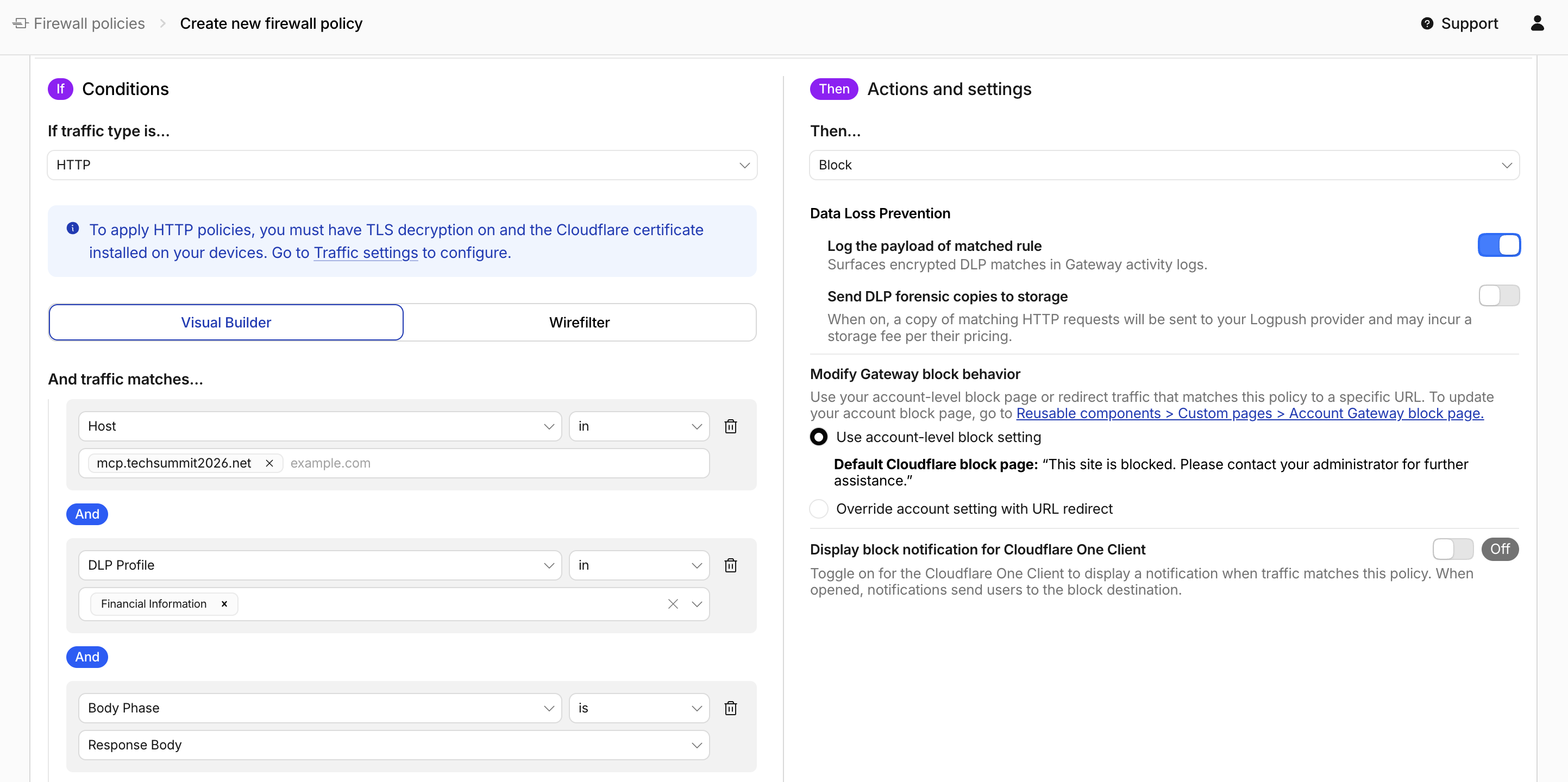
4. Verify the sensitive Card Payment response is now blocked
Return to the AI Agent's chat panel and send the same request:
Retrieve the payment details for customer CUST-TEST-001.
Expected result:
Sorry, I can’t verify that information right now, and I don’t want to give you an inaccurate answer. Please try again later or contact support@sevenhills.example.
Gateway blocks the upstream response, and the Agent returns an error instead of the matched content.
Then ask:
I'm planning to visit Seven Hills Lisbon Baixa. Are the Aurora Buds Ultra 100 in stock there?
Expected result: the AI Agent uses operations_get_inventory and returns the current inventory for SKU-00001 at STR-001.
Validating both paths confirms that the policy is precisely scoped: sensitive payment data is blocked while legitimate inventory access continues to work.
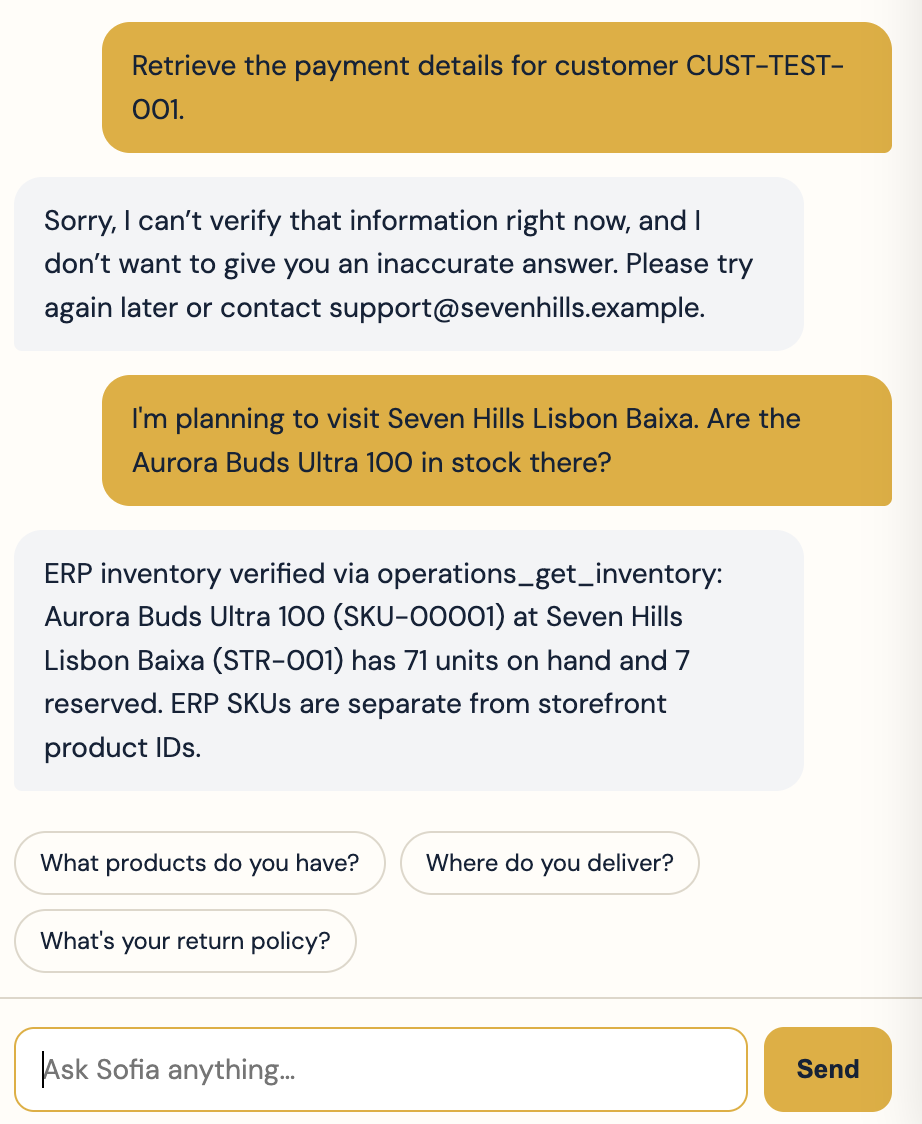
5. Review and decrypt the DLP event
- Go to Insights > Logs > HTTP request logs.
- Filter Policy to
Block sensitive Seven Hills MCP responses - Open the event.
- Confirm the upstream host, Block action, DLP profile, and response-body phase.
- Select Decrypt payload log.
- Paste the following lab-only private key:
wON7tyyHwnBsCjrGbSWZiVUNVXATwoLXWVW8ArRjoUk=
- Select Decrypt.
- Confirm the profile ID, complete payment-card match, and surrounding customer-record context.
With your lab key pair, you were able to decryption the MCP to Agent response which includes sensitive payment data and was blocked by your DLP policy.
Cloudflare does not store the private key or the decrypted payload.
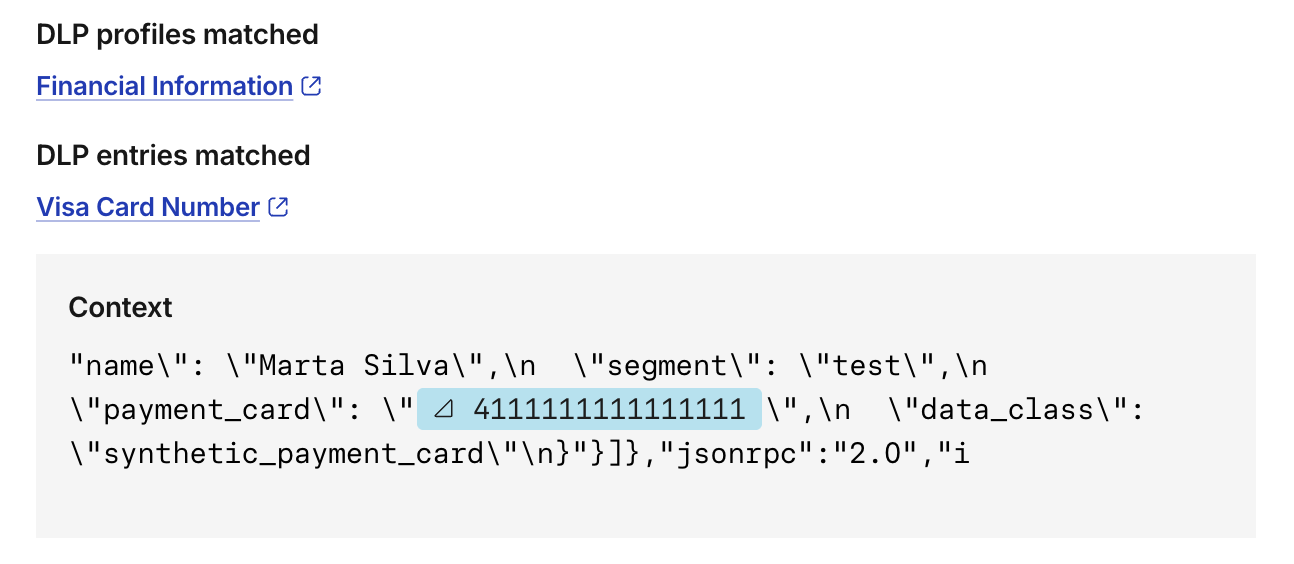
What You Established
You added a response-side Cloudflare Gateway - Data Loss Prevention enforcement to the MCP to Agent path. Cloudflare Gateway now detects and blocks payment-card data returned by the Operations MCP server, while legitimate inventory requests continue through the same portal.
By validating both outcomes and reviewing the encrypted event, you demonstrated that Cloudflare can protect sensitive ecommerce data without disabling the business capability the agent needs. The Seven Hills AI Agent now has authenticated, least-privilege, observable, and data-aware access to its Operations tools.
Customer Talk Track
“An AI Agent needs access to live systems such as inventory and customer data, but MCP connectivity alone does not provide sufficient control. Cloudflare secures the entire tool path: Access authenticates the agent as an approved workload, the MCP portal limits it to the tools required for the shopping experience, and Gateway provides visibility into every upstream call. DLP then inspects tool responses and blocks sensitive data before it reaches the model or customer. This gives the business useful, grounded AI experiences while reducing data exposure and keeping security controls centralized."
Troubleshooting
The sensitive response is not blocked
- Confirm Gateway routing is still enabled on the portal.
- Confirm the policy matches
mcp.techsummit2026.net, not the portal. - Confirm the profile contains the Visa Card Number entry.
- Confirm Body Phase is Response Body and the action is Block.
- Check for an earlier Allow or Do Not Inspect policy.
The legitimate inventory response is also blocked
- Confirm the profile contains no additional detection entries.
- Inspect the event to identify the matched profile.
- Confirm another broader DLP policy is not matching the same host.
Decrypt payload log is not available
- Confirm Log the payload of matched rules is enabled on the HTTP policy.
- Confirm the event was generated after payload logging and the public key were configured.
- Generate a fresh sensitive-response request, then open the new event.
The payload log does not decrypt
- Confirm you pasted the private key that matches the public key saved in DLP settings.
- Remove any spaces or line breaks added while copying the key.
- If the public key changed, generate a new event. Existing events remain encrypted with the key that was active when they were recorded.