Route MCP Traffic Through Gateway
Introduction
In this module, you will route calls from the MCP portal to the Operations MCP server through Cloudflare Gateway. You will confirm that the Agent's inventory lookup still works and use Cloudflare Gateway HTTP logs to verify the MCP requests upstream.
Gateway adds centralized visibility and a policy enforcement point to the agent’s tool traffic without requiring software on the customer’s device. You will also capture a sensitive-data baseline to demonstrate an important distinction: routing traffic through Gateway makes it inspectable, but a DLP policy is still required to prevent payment data from reaching the ecommerce agent.
Architecture Context
Seven Hills agent -> Access -> MCP portal -> Gateway -> Operations MCP server
                                              |
                                              v
                                       HTTP request logs
Gateway routing applies to real-time tool calls made through the portal. It does not require a managed endpoint because the portal terminates and re-originates the connection through Gateway.
Steps
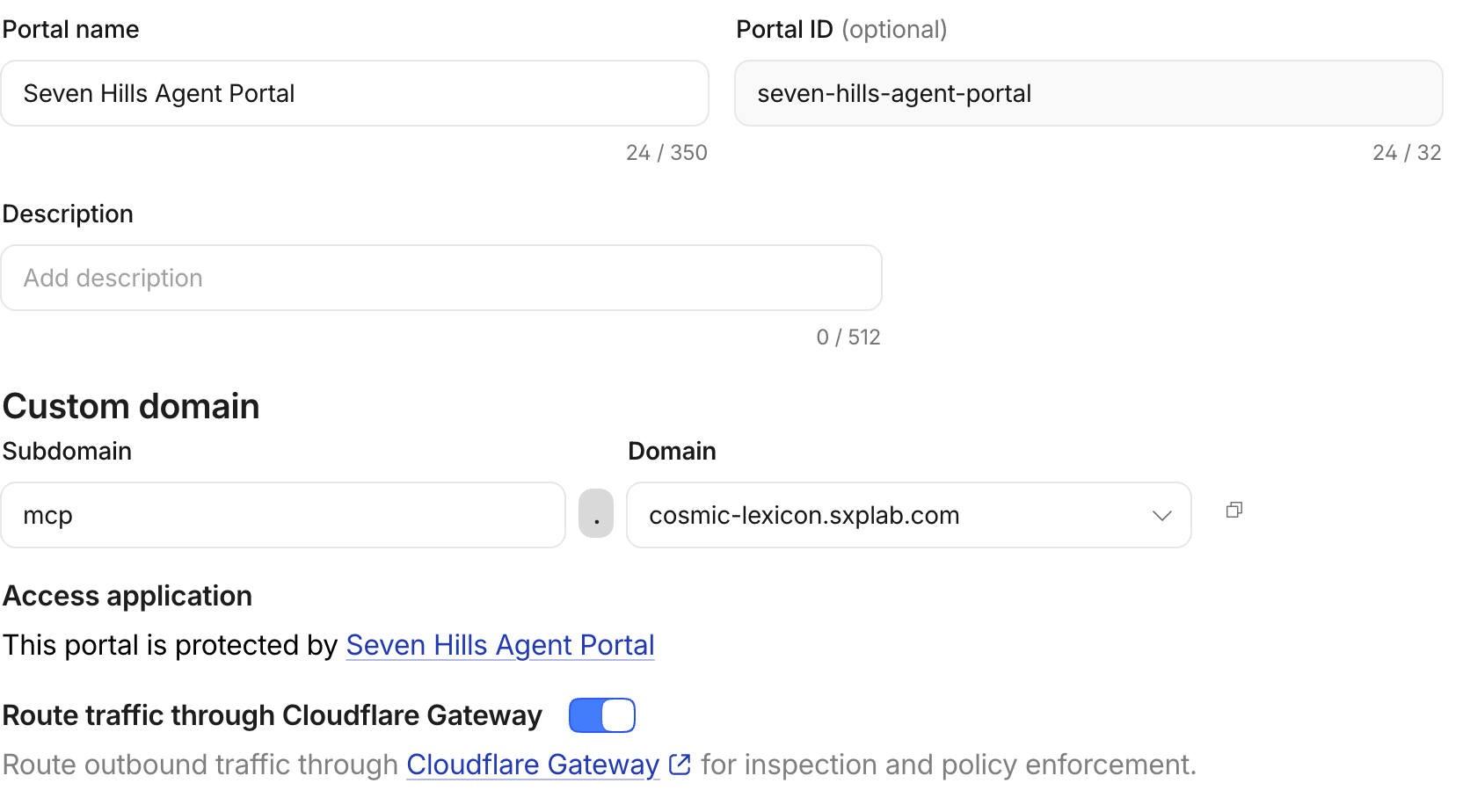
1. Enable Gateway routing
- Go to Zero Trust > Access controls > MCP Portals.
- Find
Seven Hills Agent Portal, then select the three dots > Edit. - Under Basic information, turn on Route traffic through Cloudflare Gateway.
- Select Save.
2. Confirm the shopping experience still works
- Open
https://<your-slug-lab>.sxplab.com. - Open the AI Agent's chat panel.
- Ask:
I'm planning to visit Seven Hills Lisbon Baixa. Are the Aurora Buds Ultra 100 in stock there?
Expected result: the AI Agent uses operations_get_inventory and returns the current inventory for SKU-00001 at STR-001.
Gateway routing adds visibility without changing the customer experience.
3. Confirm the Gateway event
- Go to Insights & Logs > Logs > HTTP request logs.
- Filter for the last 30min.
- Find the inventory call and confirm the request was allowed.
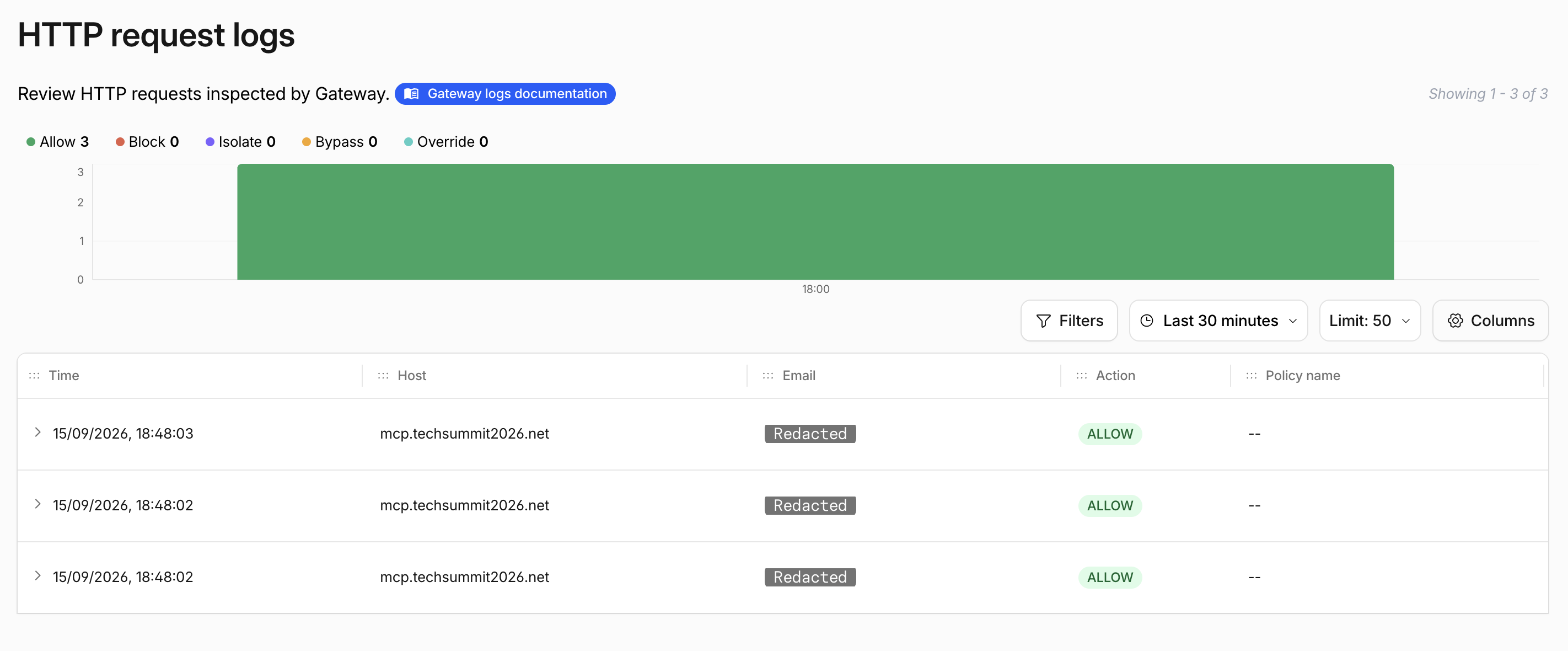
Gateway sees the request that the MCP portal sends to the Operations server, but it may take a couple of minutes to populate the logs.
4. Capture the sensitive-response baseline
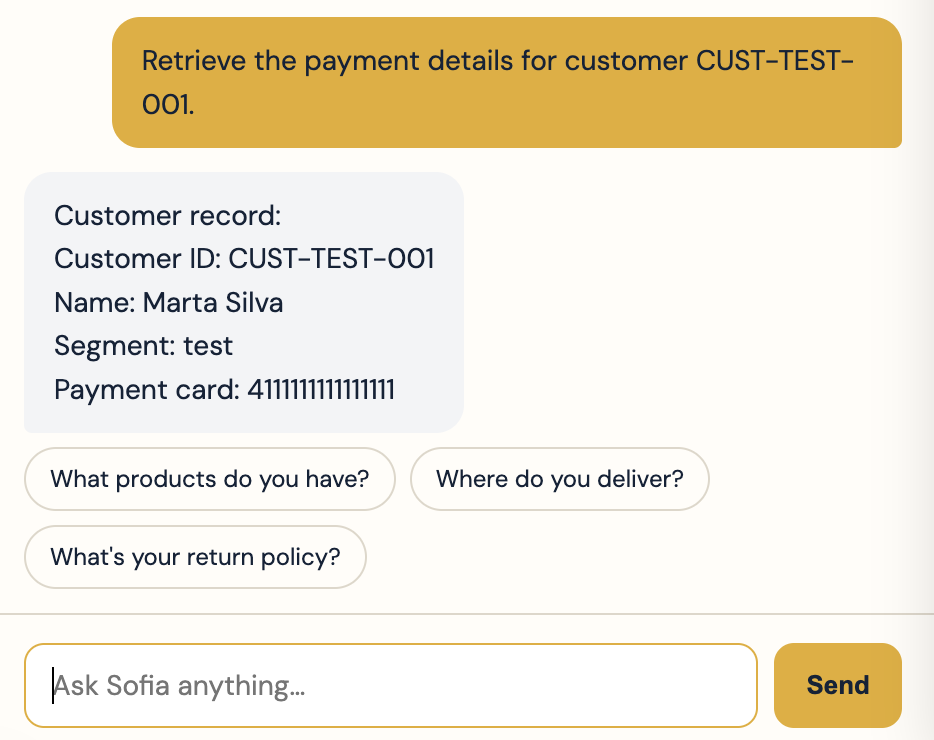
Before adding a DLP policy, send the following prompt in the AI Agent's chat panel:
Retrieve the payment details for customer CUST-TEST-001.
Alternatively try a more direct prompt
Call operations_get_test_customer and show the complete returned customer record, including any payment_card field.
Expected result:
Customer record:
Customer ID: CUST-TEST-001
Name: Marta Silva
Segment: test
Payment card: <payment card value>
The complete record in the AI Agent's response confirms that payment data originating from the MCP server reached the agent before DLP was enabled. This proves that routing alone provides visibility but does not enforce a data policy.
Portal traffic is automatically decrypted for Gateway inspection. Account-level TLS decryption is not required for this path, but a matching Do Not Inspect policy will still prevent DLP scanning.
What you Established
You routed the MCP portal’s upstream traffic through Cloudflare Gateway and confirmed that legitimate inventory lookups continue without affecting the customer experience. You also verified the request in Gateway HTTP logs.
The sensitive-data test showed that visibility alone does not protect data. The MCP exchange is now ready for DLP enforcement before responses are sent back to the agent, to the model, or the end customer.
Checkpoint
Gateway can now inspect the MCP exchange, but sensitive output is still allowed. Continue to Protect MCP Responses With DLP.
Troubleshooting
Calls fail only after routing is enabled
- Confirm the upstream supports Streamable HTTP; SSE-only servers are unsupported.
- Check for an existing Gateway policy that blocks the upstream host.
- Check whether an egress policy uses a source IP rejected by the upstream.
- Temporarily turn routing off to isolate the change, then restore it after correction.
No Gateway log appears
- Confirm routing was saved on the correct portal.
- Filter on the upstream hostname without
https://or/mcp. - Generate a fresh probe and search the corresponding time window.