Establish the MCP Baseline and Agent Identity
Introduction
In this module, you will confirm that the AI agent cannot access MCP tools just yet. Then you will check the pre-provisioned Operations MCP server, and create a dedicated identity for the Seven Hills agent in Access.
For this, you will use a Cloudflare Access service token and Service Auth policy to identify the application as an approved workload. This establishes a centrally managed, revocable trust boundary before connecting the AI Agent to inventory MCP tools and other operational data in the next module.
Architecture Context
Seven Hills agent ----X----> MCP tools
                not connected yet

Access service token + Service Auth policy
                created, not enforced yet
This separates identity creation from connectivity. A service token is a revocable workload credential.
Steps
1. Verify the disconnected baseline
- Open the Seven Hills application.
- Open Chat with Sofia.
- Send:
Is the Aurora Buds Ultra 100 available at Lisbon Baixa?
Expected response:
Sorry, I can’t verify that information right now, and I don’t want to give you an inaccurate answer. Please try again later or contact support@sevenhills.example.
Seven Hills has no backend systems integrations provisioned yet, so it defaults to a pre-canned answer. If identity, tool authorization, or connectivity prevents verification, it fails closed without making an inference call. In production, you may preserve this control pattern while improving error classification, observability, and customer-facing responses.
2. Verify the Operations MCP server
Open the facilitator-provided health URL:
https://mcp.techsummit2026.net/health
This Operations MCP server exposes ERP capabilities for stores, products, inventory, sales, suppliers, purchase orders, promotions, employees, customers, and business reporting. In this lab, the AI Agent uses get_stores and get_inventory to answer availability questions, while we will use a synthetic get_test_customer tool to demonstrate data loss prevention.
For an ecommerce AI agent, MCP provides a standard connection to current operational data. This lets the agent ground answers in real inventory and store records instead of requiring custom integrations with backend systems.
Expected result:
{
  "status": "ok",
  "server": "Seven Hills Operations MCP",
  "version": "2.1.0",
  "mcp_endpoint": "/mcp",
  "data_profile": {
    "stores": 25,
    "skus": 250,
    "inventory_rows": 6250,
    "customers": 1000,
    "sales_orders": 10000,
    "suppliers": 15,
    "purchase_orders": 300,
    "employees": 80,
    "promotions": 10,
    "sales_history": "2025-09-04 to 2026-09-04",
    "currency": "EUR"
  },
  "tools": [
    "get_stores",
    "get_products",
    "get_inventory",
    "get_sales",
    "get_suppliers",
    "get_purchase_orders",
    "get_promotions",
    "get_employees",
    "get_customers",
    "get_sales_summary",
    "get_top_products",
    "get_inventory_valuation",
    "get_customer_insights",
    "get_test_customer"
  ]
}
The sales_history dates reflect the current generated dataset and may change when the upstream server is refreshed.
Do not connect the agent directly to this URL. We'll use a Cloudflare MCP server portal to govern our agent's MCP integrations.
3. Create the agent service token
- Go to Zero Trust > Access controls > Service credentials > Service Tokens.
- Select Create Service Token.
- Set Name to
seven-hills-agent. - Pick a Service Token Duration
- Select Generate token.
- Copy both credentials. Keep this page open, or hold them temporarily in a private local text editor, until you add them as Worker secrets in the next submodule.
If you lose the Client Secret, create a new token and use the replacement consistently in the policy and Worker.
4. Create a reusable Service Auth policy
-
Go to Access controls > Policies.
-
Select Add a policy.
-
Set Action to Service Auth.
Select Service Auth before configuring the Include rule. The Service Token selector is only displayed after this action is selected.
- Under Include, select Service Token, then
seven-hills-agent.
Make sure to select Service Auth and not Allow, or your Agent will not be able to authenticate to MCP Portals
- Set Policy name to
Allow Seven Hills agent.
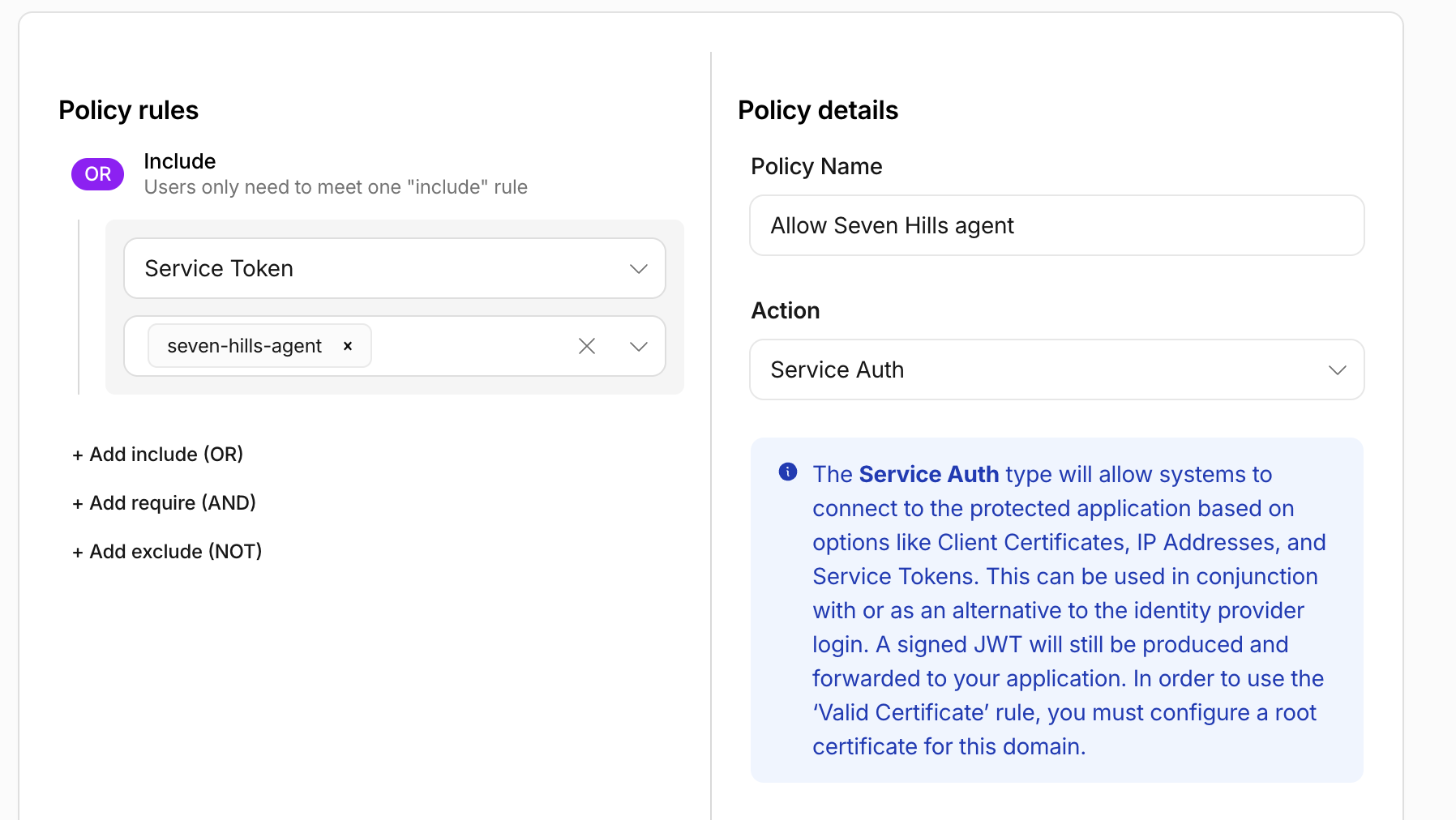
- Select Save Policy.
What You Established
Verified the agent is yet unable to access MCP systems, confirmed that the approved Operations MCP server and its ERP tools are available, and created an seven-hills-agent service token the agent will use, and an Allow Seven Hills agent Access policy that will allow the agent to connect to systems using its service token.
We will connect the agent to MCPs in the next module
Checkpoint
You have established the before-state and created the agent identity. Continue to Connect the Agent Through an Authenticated Portal.
Troubleshooting
The health endpoint fails
- Confirm that you used
/health, not/mcp. - Confirm the hostname against your lab worksheet.
- Ask the facilitator to verify the shared upstream before continuing.
The service token secret was lost
Create a replacement token. Cloudflare cannot display the original Client Secret again.